Two big ones this month. You can now translate your ads into multiple languages without leaving 30characters, and monitor your campaign spend in real time so you’re not caught off guard at the end of the month.
Here’s everything that shipped.
Ad Translations
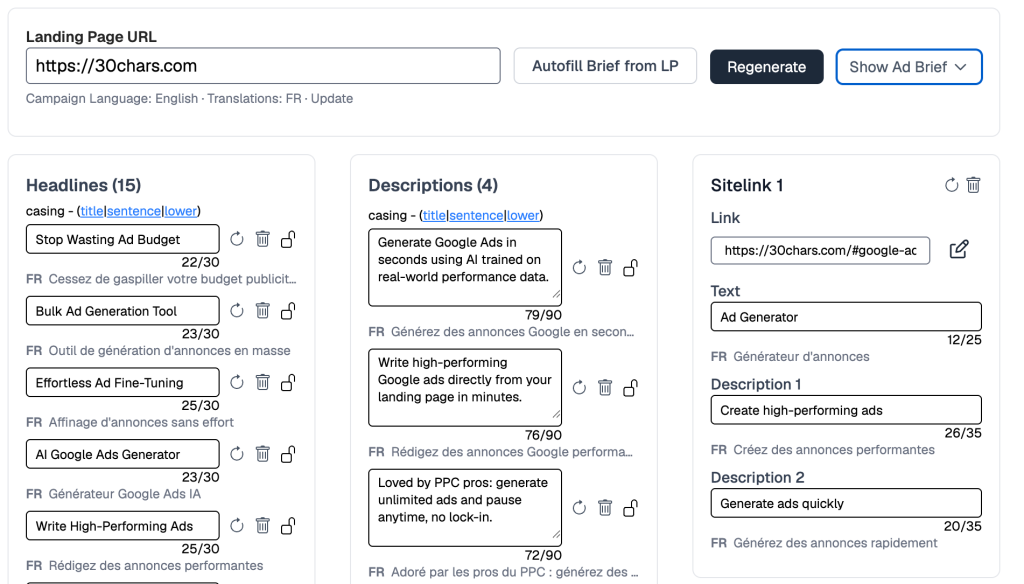
Select up to 5 target languages, and 30characters translates all your headlines, descriptions, callouts, and sitelinks automatically. Every translation respects Google Ads character limits per content type, so you’re not manually trimming German headlines that ran 12 characters over.
If you edit a headline after translating, the translation gets flagged as “(outdated)” so you know exactly what needs refreshing. And when you do refresh, it only re-translates the content that changed, not everything from scratch.
The system knows the exact character limits for each content type (30 for headlines, 90 for descriptions, 25 for callouts) and stays within them. Click any translation to copy it to clipboard.
If you’re running campaigns across markets or managing multilingual clients, this should eliminate the spreadsheet export, external translation, copy-paste-back loop entirely.
Budget Pacing
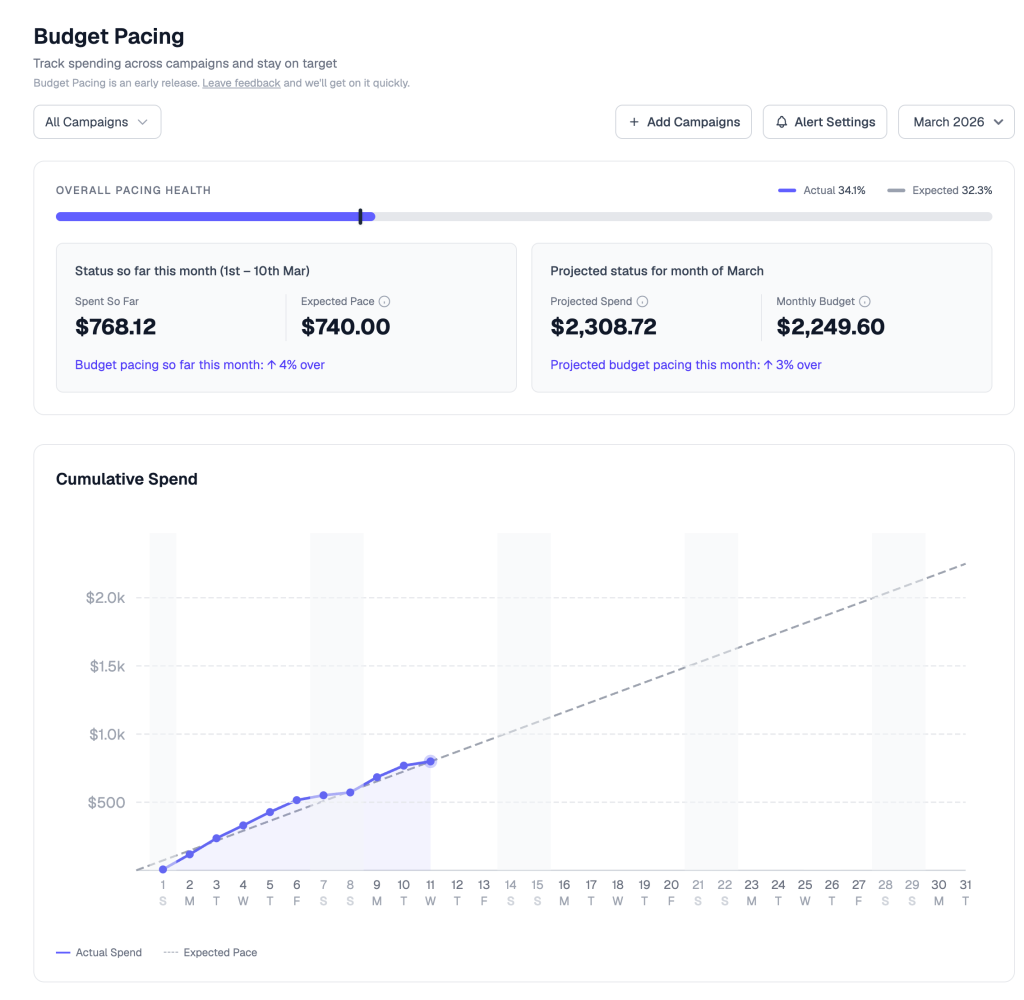
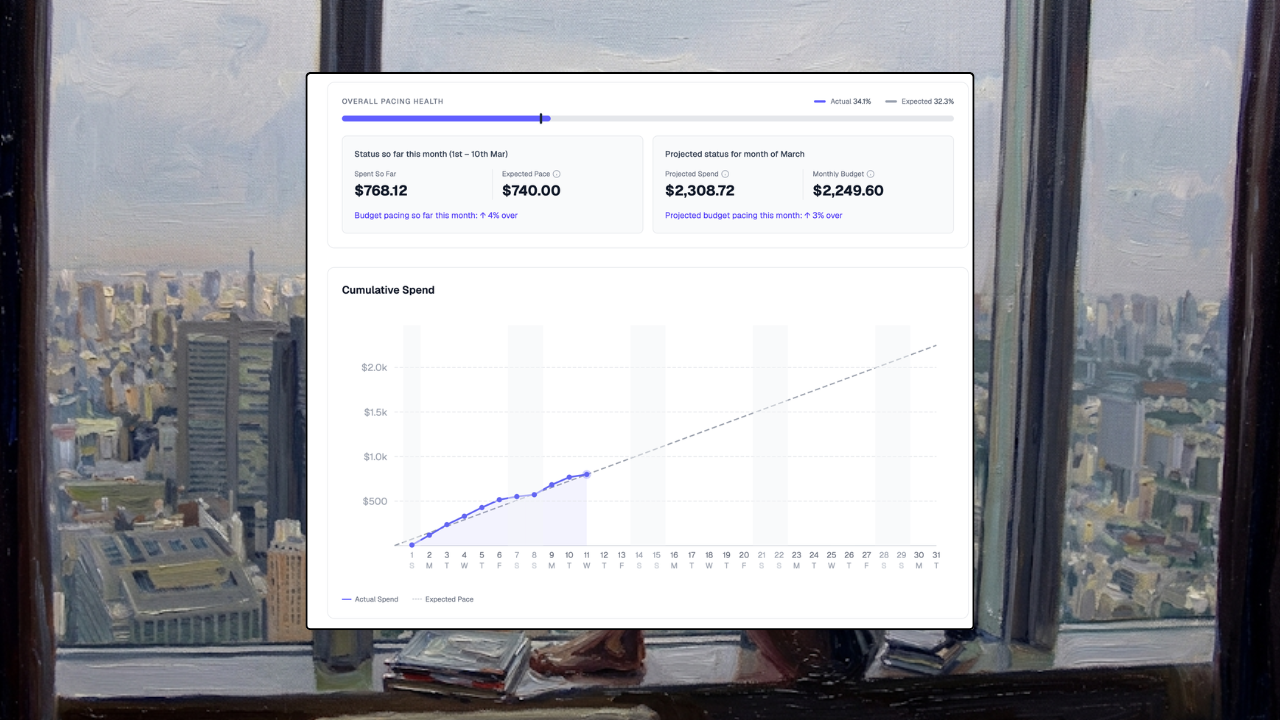
Real-time spend monitoring for your Google Ads campaigns. See whether each campaign is on track, underpacing, or overpacing relative to its monthly budget, with a projected end-of-month spend number.
The dashboard gives you an account-level summary plus individual campaign cards, each with a pacing status badge: On Track, Underpacing, Overpacing, or Paused. There’s a cumulative spend chart showing actual vs. expected spend as a visual trend line.
Alerts are customizable. Set your own overpacing threshold (default is 110%) and underpacing threshold (default is 80%), with grace periods and consecutive-check requirements so you’re not getting pinged over normal daily fluctuations.
If you’d rather get a single daily summary instead of instant alerts, there’s a digest mode that sends a morning email at 7 AM UTC covering all your campaigns. You can also review past months’ pacing patterns to spot trends over time.
This was one of the most requested features on the roadmap. If you’ve ever burned budget because a campaign overpaced on a weekend and you didn’t catch it until Monday, this is the fix.
Campaign & Ad Stats
Synced campaigns now show real performance data. Clicks, impressions, and CTR for the last 30 days show directly on campaign pages and ad cards. Status indicators (green for enabled, yellow for paused, red for removed) make it easy to see what’s live at a glance.
Keywords now show on ad group detail pages too, giving you extra context when building ads.
Also improved
Callout and sitelink editing. You can now add, delete, and re-generate individual callouts and sitelinks instead of regenerating the whole batch. Max raised to 8 for both.
PMAX improvements. You can now push net-new ads into PMAX campaigns. Placeholder assets (images, logo, business name) are provided automatically to meet Google’s minimum requirements, and the asset group is created as paused so you can swap in your real assets before going live.
Faster performance across the board. More parallel calls means navigation and syncs should be noticeably faster.
Book a demo. Want to walk through your account or have questions about setup? There’s now a Book a Demo option on your dashboard.
Bug fixes
A few things cleaned up behind the scenes:
Campaign sync timeouts on large accounts.
PMAX regeneration and casing operations silently failing.
Stale sync error messages not clearing after successful sync.
MCC account edge cases in import and push flows.
What’s Next
Sitelink and callout generation is getting better, particularly for non-English languages. Multi-user support and full campaign creation support are also in the works. More on that soon.
Until the next one!
— Raymond